Network Interfaces
Network interfaces are logical configurations that dictate how routers interact with different networks.
Interface Overview
Section titled “Interface Overview”After logging in to the router, click “Network > Interfaces” to view and manage the network interfaces, as shown below.
The background colors of the first column do not indicate their connection status; instead, they identify their firewall zones. The second column provides brief information and the connection status of each interface.
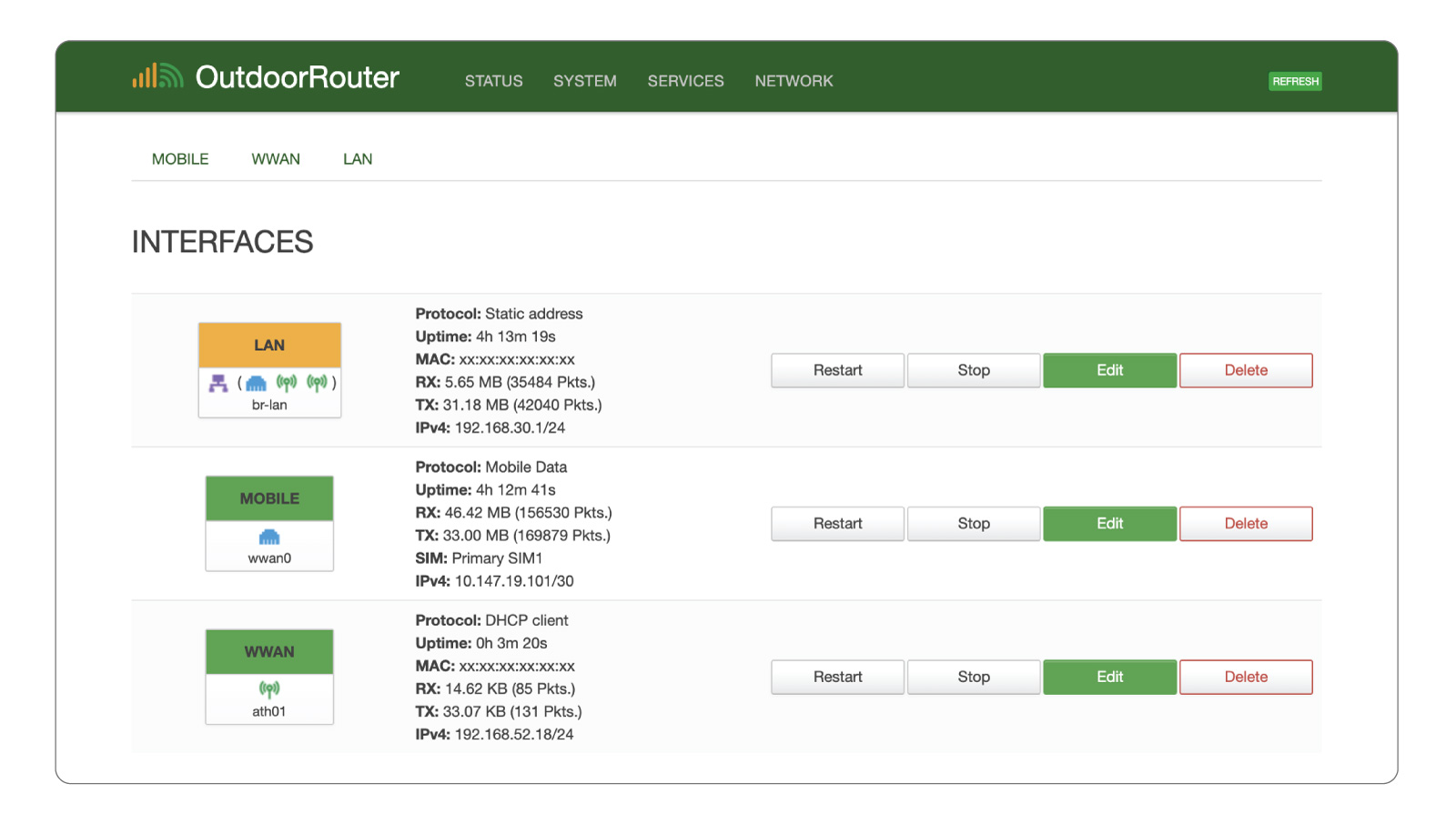
EZR35-5G Router's Network Interface Overview
Explanation of Terms
Section titled “Explanation of Terms”Protocol – The communication rules and methods used for data transmission.
Uptime – The duration of the network interface’s continuous operation since the last connection. H is hours, M is minutes, and S is seconds.
MAC – Short for Media Access Control, a unique hardware identification number assigned to each network interface, displayed as six pairs of hexadecimal digits.
RX – Received (download) packets. TX – Transmit (upload) packets. They indicate the real-time data stream instead of the internet speed.
IPv4 – Short for Internet Protocol version 4
LAN (bar-lan)
Section titled “LAN (bar-lan) ”This is the leading local intranet network interface assigned to the physical RJ45 LAN & PoE port and logical Wi-Fi hotspots. To configure the local intranet networks, refer to the section below.
Mobile (wwan0)
Section titled “Mobile (wwan0) ”This is the virtual interface of the mobile modem.
Click the “Edit” button to change the mobile protocol, APN, SIM card, PIN code, etc. For more information, refer to the Mobile Modem settings.
The router automatically connects to the mobile network when it is turned on. You can manually restart or stop the mobile modem when necessary by clicking the “Restart” and “Stop” buttons.
WWAN stands for Wireless WAN (wireless wide area network). They are virtual interfaces for wireless Wi-Fi relay connections on the 2.4 GHz and 5.8 GHz frequency bands.